One assistant. Every step from model to production.
Live geometry
Sees how the model is built
Not a picture of the part, but the live geometry: feature tree, how the part was built and how the assembly fits together. So it advises on a specific feature.
▸ Part1
Base-Flange1
Edge-Flange2 R0.5 too tight for t = 3 mm
Cut-Extrude3 · 4× Ø9
Fillet1 · R2
Flat-Pattern1
Material <S235JR>
Drawing intelligence
Understands drawings, not pictures
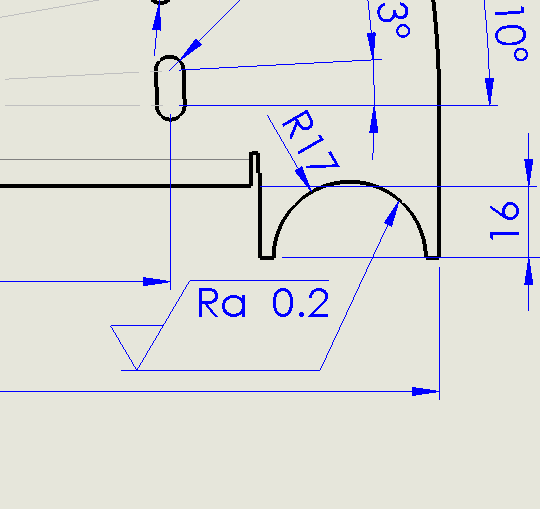
No OCR. Axion reads symbols and their links to geometry: it knows Ra 0.2 sits on the R17 cut-out of a sheet-metal part, where such a finish is needlessly expensive.
Ra 0.2 → R17 cut-out
Design for manufacturing
Thinks about production first
Based on your shop's capabilities, it flags features that are hard to make, needlessly expensive or likely to cause a complaint.
R1 < tool R3Hole depth 10×DWall 1.2 mm OK
Cost
Knows the cost and how to lower it
Estimates production cost from geometry, material and tolerances, refines it with your price lists, quotes or ERP data and proposes cheaper production routes.
Machined75 €
Sheet metal31 €
Reuse part10 €
Standards
Checks standards and data quality
It checks drawings, parts, assemblies and documents against technical standards and company rules, marks the findings right on the drawing and returns a clear OK / NOK table – also as a PDF or Word report in your own template, or in Excel.
ISO 2768-mOK
Sheet format A3OK
Title block · materialNOK
Drawings
Drawings in a fraction of the time
Views, scale, dimensions, BOM and flat pattern from your company templates. You only fine-tune.
3 views · 1:2DimensionsBOMFlat patternDXF
Part reuse
Don't draw the same part twice
Finds geometrically similar parts and mating parts in your database.
96%
88%
71%
Modeling
And when you need it, it models too
From a drawing or a brief, Axion builds the part with fully defined sketches and material. A fast start you then shape to your intent.
Local-first
Your data stays yours
Most features run locally in the add-in, with no AI and nothing sent anywhere. The AI provider joins only in chat, with only what the question needs.
Augmented reality
Your model on the table, in real size
One click sends the part or assembly to your phone: scan the QR code and view it in 3D or place it in the room with AR – on iPhone and Android, with colours, without uploading anything to the cloud.
Reports
Reports in your company template
Save any check or analysis as a PDF or editable Word report with your logo and layout, or send its tables to Excel. Attach Word and Excel documents and Axion works with their content.
The panel
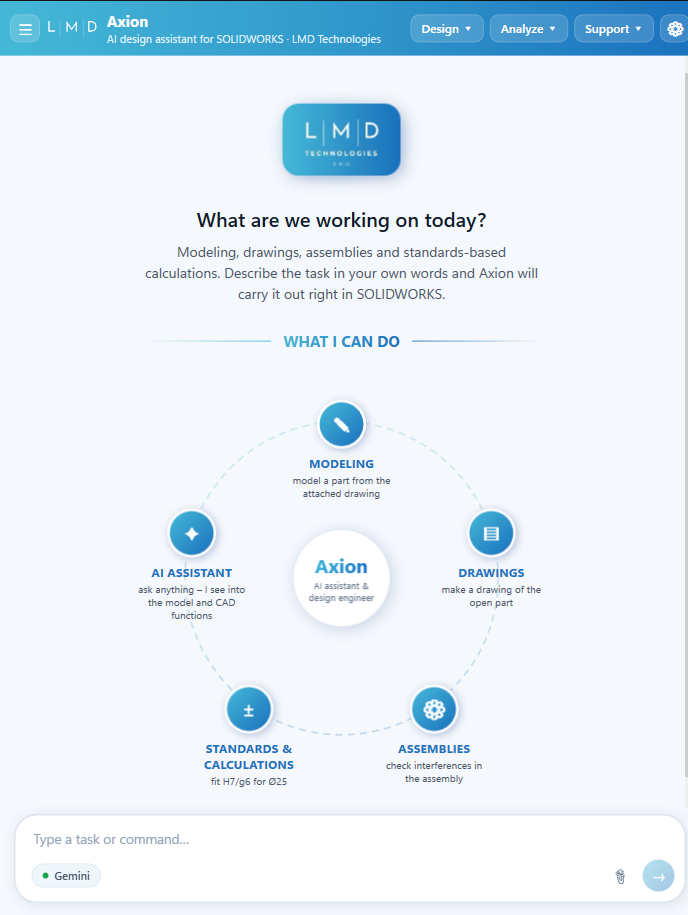
This is what Axion looks like in SOLIDWORKS.
A task pane docked next to your model. No separate app, no browser tab.
1
Design · Analyze · Support
Tools grouped the way engineers work: modeling and drawings, checks and calculations, help and contact.
2
What I can do
Modeling, drawings, assemblies, standards and calculations, AI assistant. The overview adapts to the functions your company deploys.
3
Plain-language composer
Describe the task in your own words or attach a drawing, image, PDF, Word document or Excel table; reuse your favourite prompts. The AI provider is your choice.
4
Settings for every user
Font size for the whole panel and company-specific rules, templates and data sources.
No. Modeling is one feature. The main value is connecting your data: reading live geometry and drawings, checking standards and manufacturability, estimating cost and reusing existing parts.
Can it follow our company standards and templates?
Yes. Templates, sheet formats, materials, rules and data sources for checks are set up for your company, so results match how you work.
Which languages does Axion speak?
Axion works in English and Czech, both in the panel and in the chat. Other languages can be added on customer request.
How do we start?
Individual engineers choose the Plus or Pro plan on the pricing page – or first try Axion free for 7 days on their own parts. For a version tailored to your company, book a meeting – we'll show Axion on your drawings and set it up for your standards.
Tailored version
Axion tailored to your company
Book a meeting. We'll show Axion on your own parts and drawings and agree which functions, standards and systems it should cover. Then we build it for you.